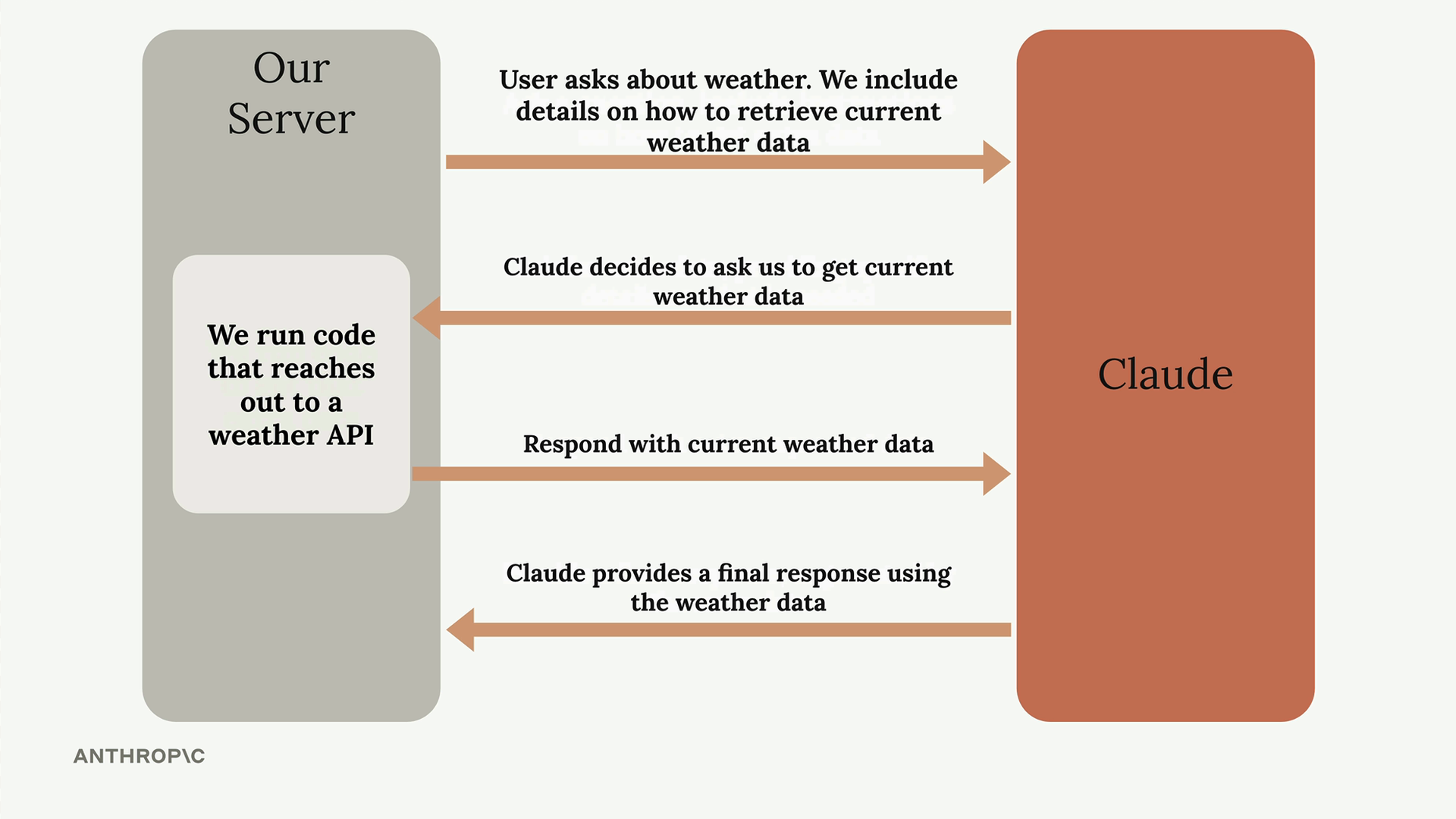
tool_use block.
③ Server runs its own code against a weather API and returns the result (tool_result).
④ Claude → Server: final answer using the data (stop_reason: "end_turn").
Diagram: Anthropic.tool_choice) in depth — this is
the surrounding machine it lives in. Once you see the full request → tool_use → tool_result
loop, the rest of Domains 1 & 2 (loops, MCP, errors) clicks into place — and these were exactly your
"right instinct, low confidence" areas in the diagnostic.
A tool is just a function you describe to Claude — three parts:
| Part | What it is | Why it matters |
|---|---|---|
name | identifier, e.g. lookup_order | how you reference the call |
description | plain-English: what it does, inputs, when to use vs. similar tools | primary mechanism Claude uses to pick the right tool |
input_schema | JSON schema of the arguments | guarantees the structure of what Claude sends |
Claude never runs the tool. It only decides to call it and hands you the arguments. Your code (or an MCP server) does the actual work.
tool_use block.
③ Server runs its own code against a weather API and returns the result (tool_result).
④ Claude → Server: final answer using the data (stop_reason: "end_turn").
Diagram: Anthropic.tool_choice (you set, step 1) is not the partner of tool_use. It's a rule that influences step 1.tool_use (Claude asks, step 2) ↔ tool_result (you answer, step 4).stop_reason: "tool_use" = keep looping; "end_turn" = stop. Never stop on an iteration cap or by reading the text for "done."| Lever | Controls | Fix it when… |
|---|---|---|
| description | which tool Claude picks | it misroutes between similar tools → improve descriptions first |
| tool_choice | whether & which tool must be called | you need a guaranteed call → "any"; a specific one → forced |
| input_schema | the structure of the output | you need valid JSON → schema kills syntax errors (not wrong values) |
An MCP server is a separate process that exposes tools (and resources) over a standard protocol. The description and the implementation live on the server — not in your request.
tool_choice treats them like any tool.isError: how an MCP tool signals a failure back (instead of faking success)..mcp.json (project, shared, version-controlled) vs ~/.claude.json (personal); credentials via ${ENV_VARS}, never committed.Recall, don't recognize. Pick before the feedback shows.
tool_use → tool_result
cycle. Highest-trust source for this lesson.